
Run Check Model
-
Open the Analysis panel and click Check Model. It needs no Python and takes a moment.
-
Read the report that opens on the right.
You should see: No issues found and the line Check Model found no issues. A clean report is the goal before every run.
You do not have to remember to run it. Run Analysis and OpenSeesPy Script both run the same check first.
Read the report
Findings are grouped under a heading such as SUPPORTS. Each one is either an error (red) or a warning.
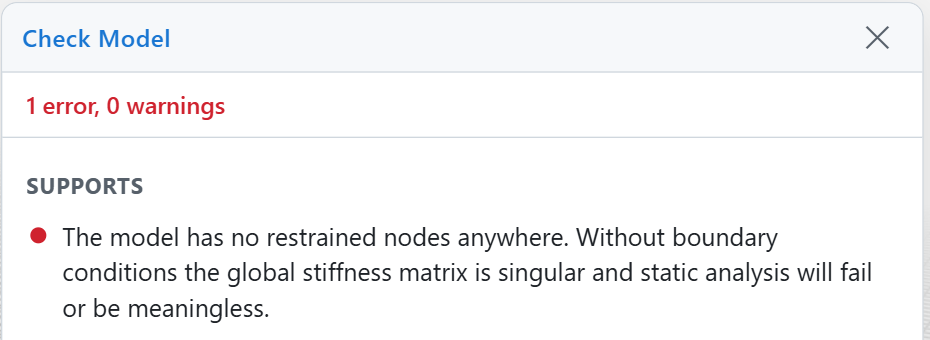
| Error | The analysis will fail, or the answer will be meaningless. Fix these before running. |
| Warning | Something looks wrong but may be intentional. Look at each one and decide. |
If you click Run Analysis or OpenSeesPy Script while errors remain, vfopro stops and asks:
This model has 1 error(s) that may produce incorrect or failed results. Continue anyway?
Cancel returns you to the model with the report open. Confirm runs anyway. Warnings never block a run.
What Check Model looks for
| Connectivity and geometry | Duplicate node or element numbers; an element that points at a node that does not exist; zero-length members; nodes at the same place that are not connected (warning); nodes that nothing uses (warning); a group of members with no support anywhere in it. Fix: delete or merge the duplicates, reconnect the element, or add a support. |
| Supports | No restrained node anywhere in the model; a support on a node that no element reaches (warning). Fix: assign restraints at the base. |
| Sections and materials | An element with no section, or a section or hinge that refers to something that no longer exists; a material with a stiffness of zero or less; an elastic frame section missing its area or inertias. Fix: assign or redefine the missing property. |
| Loads | A load pattern that loads a node or element that does not exist; a load case that names a pattern that does not exist; a static load case with no loads at all (warning). Fix: reassign the loads or correct the case. |
| Mass | A modal or dynamic case with no mass source, a mass source name that does not exist, or a total mass of zero. Fix: define a mass source and assign it to the case. |
| Constraints | A diaphragm, equal-DOF or rigid-link constraint that refers to a missing node, or ties a node to itself. Fix: redefine the constraint. |
| Links | A link element with no stiffness in any direction (warning), which makes it a mechanism. |
| Units and outliers | Members that are implausibly short or long, or a node far outside the rest of the model (warnings). These are the usual signs of the wrong unit system or a typo in a coordinate. |
Checks while you enter data
vfopro also refuses bad input at the moment you enter it, so many problems never reach the model. Examples: a section, material or pattern with no name or with a name that already exists; a width, depth or radius that is not a positive number; a reference to a material or section that has not been defined. The message says what to correct, and nothing is added until you do.
Status while an analysis runs
Once the analysis is running, the Status column in the Analysis panel follows each load case:
| Running | The case is being solved. Click Monitor to watch its convergence. |
| Complete | The case converged and its results are saved. |
| Failed | The solver stopped at a step it could not converge. Check the loads, the model and the analysis settings, then run the case again. |
What Check Model cannot tell you
Check Model looks for broken data, not bad engineering. It will not tell you that:
- a load or a section property is wrong for your building;
- hinge strengths and rotation limits are appropriate;
- the structure is strong enough, or the mesh fine enough;
- a nonlinear case will converge. Convergence problems appear only when the case runs.
Fix every error, read every warning, run Check Model again until it is clean, save, then run. Check the results against a hand calculation before you rely on them.
Last updated September 21, 2026 · applies to vfopro 20260922.0.0 or later